

Download Dyrii Journal – Advanced Multimedia Journalling App for Windows, macOS, Android & iOS
Why Dyrii Journal Stands Out in the Crowded Journalling Space
In a world where daily reflections, travel logs, and creative brainstorming often live in scattered notes, photos, and voice memos, Dyrii Journal brings everything together under one secure, intuitive interface. This advanced multimedia journalling app is built for anyone who wants to chronicle life with more depth than plain text can provide. Whether you’re a seasoned writer, a traveler capturing every sunset, a student preserving lecture recordings, or a visual artist sketching ideas on the go, Dynii Journal offers a rich set of tools that transform a simple diary into a living, breathing archive.
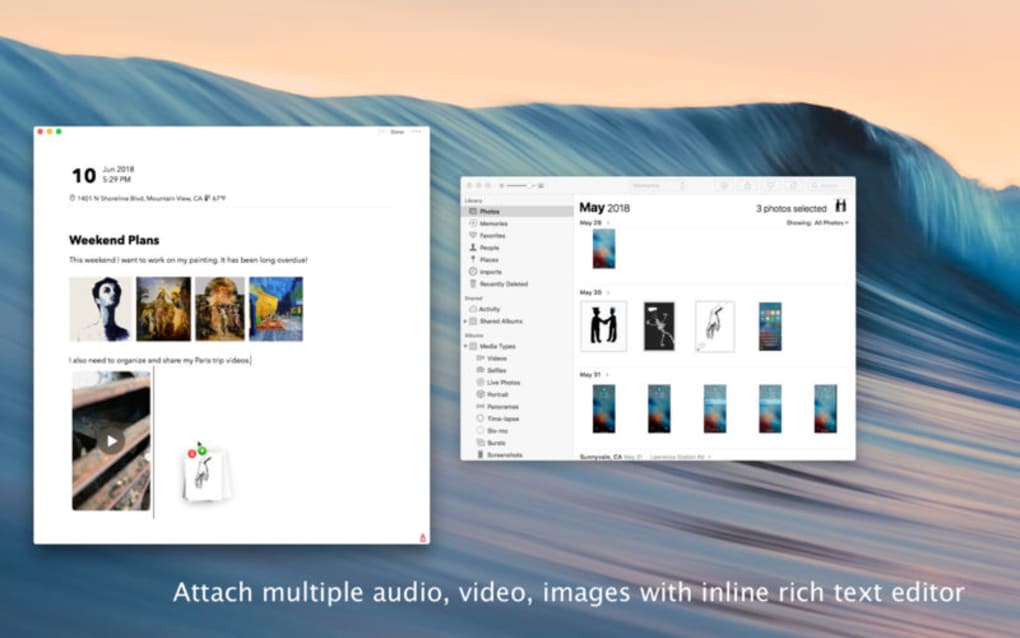
The app’s core philosophy is simplicity without compromise. It lets you add location tags automatically, embed high‑resolution photos, embed short video clips, record voice notes, and even write or draw with a stylus‑friendly handwriting mode. All entries are stored in an encrypted local database, with optional cloud sync for seamless access across devices.
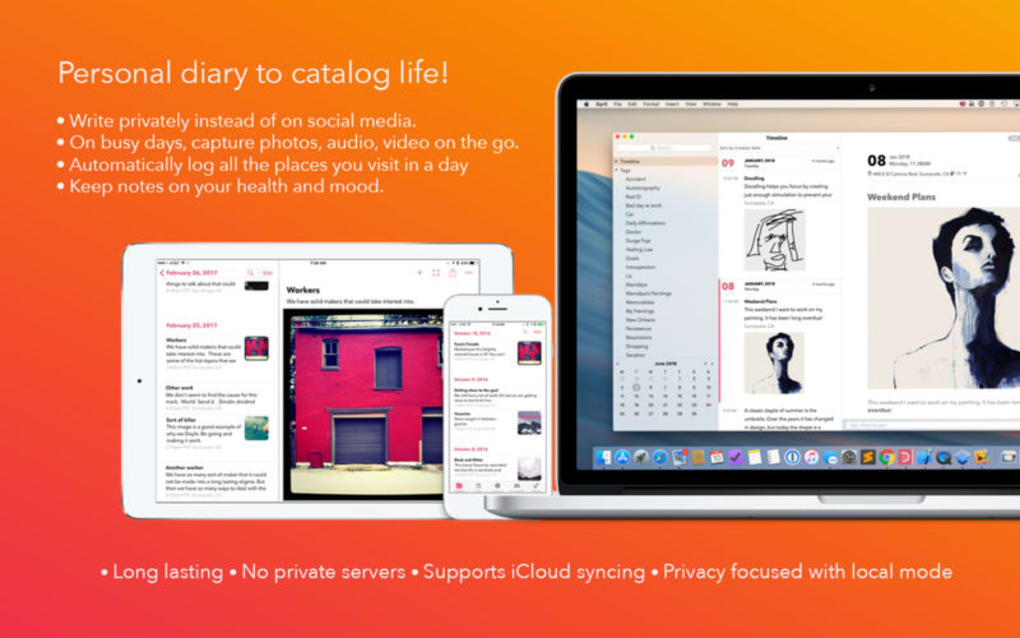
The interface follows a clean, card‑based layout that adapts to light or dark mode, ensuring readability at any hour. Moreover, Dyrii Journal respects privacy; you control what data is shared, and the app never sells your information to third parties. For those who love organization, the app includes powerful tagging, search, and timeline filters that let you locate a specific memory within seconds.
The built‑in analytics show you journalling habits over weeks, months, or years, encouraging consistency and personal growth. In short, Dyrii Journal is more than a note‑taking tool—it’s a comprehensive life‑logging companion that blends creativity, security, and usability in a single, free‑to‑download package.
Key Features That Make Dyrii Journal a Must‑Have Tool
- Multimedia Integration: Attach photos, videos, audio recordings, and handwritten sketches directly to any entry.
- Automatic Location Tagging: GPS data is captured (with permission) to map your experiences on an interactive world map.
- Rich Text Editor: Format text with headings, bullet points, checklists, and markdown support for enhanced readability.
- Secure Encryption: All entries are encrypted on the device; optional password or biometric lock adds an extra layer of protection.
- Cross‑Platform Sync: Sync via Dyrii Cloud, iCloud, or Google Drive to keep your journal consistent across Windows, macOS, Android, and iOS.
- Powerful Search & Tagging: Use keywords, hashtags, or custom tags to retrieve entries instantly.
- Timeline & Calendar Views: Visualize your journalling activity on a chronological timeline or monthly calendar.
- Export Options: Export entries as PDF, plain text, or JSON for backup or sharing.
- Dark & Light Themes: Adaptive UI that respects system theme preferences for comfortable reading.
- Backup & Restore: Automatic local backups and manual restore points safeguard your data against accidental loss.
Getting Started: Installation, Daily Use, and System Compatibility
Step‑by‑Step Installation Guide
Windows 10/11: Visit the official Dyrii website or Microsoft Store, click “Download,” and run the installer. Follow the on‑screen prompts to accept the license agreement and choose an installation folder. The app will launch automatically after installation.
macOS (Catalina and later): Download the .dmg file from the Dyrii website or the Mac App Store. Drag the Dyrii Journal icon into your Applications folder, then open it from Launchpad. macOS may ask you to confirm the download from an identified developer—click “Open” to proceed.
Android: Open Google Play Store, search for “Dyrii Journal,” tap “Install,” and grant the required permissions (storage, microphone, location) during first launch.
iOS: Open the App Store, locate “Dyrii Journal,” tap “Get,” and authenticate with Face ID, Touch ID, or your Apple ID password. After installation, open the app and enable location services for map features.
First‑Time Configuration and Daily Workflow
Upon first launch, Dyrii Journal walks you through a brief onboarding wizard. You’ll set a master passcode or enable biometric authentication, choose a default sync method, and optionally import existing journal files. The main dashboard displays a “Create New Entry” button, recent entries, and a quick‑access toolbar.
To create an entry, tap the plus icon, select the content type(s) you wish to add, and start typing. You can tap the camera icon to snap a photo, the microphone to record a voice note, or the pen to draw with your finger or stylus. The location tag is added automatically if you permit GPS access; otherwise, you can manually select a place from the map view. After completing the entry, press “Save.” The app indexes the entry for instant search.
The Search & Filter panel on the left side lets you filter by date range, tags, or media type. The Analytics tab shows a bar graph of entries per week, helping you maintain a consistent journalling habit. For privacy‑conscious users, the “Export & Delete” menu offers secure data export before you decide to wipe the local database.
Dyrii Journal is compatible with Windows 10/11, macOS Catalina (10.15) and later, Android 8.0+ (Oreo), and iOS 13+. The app runs smoothly on both tablets and smartphones, with responsive UI adjustments for larger screens.
Pros & Cons, Frequently Asked Questions, and Final Verdict
Pros
- All‑in‑one multimedia support eliminates the need for multiple apps.
- Strong encryption and optional biometric lock keep personal data safe.
- Cross‑platform sync ensures your journal is always up‑to‑date.
- Intuitive UI with dark mode, making it comfortable for long‑term use.
- Robust search, tagging, and timeline features boost organization.
Cons
- Free version limits cloud sync to 500 MB; larger storage requires a premium subscription.
- Export to PDF can be slow for journals with many high‑resolution images.
- Handwriting recognition is basic and may not convert complex sketches accurately.
Frequently Asked Questions
Is Dyrii Journal completely free?
Dyrii Journal offers a robust free tier with unlimited text entries and basic multimedia support. Cloud sync beyond 500 MB, advanced analytics, and priority support are part of the premium subscription.
Can I use Dyrii Journal offline?
Yes. All entries are saved locally, and you can view, edit, or create new journals without an internet connection. Sync occurs automatically when you reconnect.
How secure is my data?
Dyrii Journal encrypts every entry with AES‑256 encryption. You can add a master password or use fingerprint/Face ID for extra protection. The app never stores your data on external servers without your explicit consent.
Can I import existing journal files?
Yes. The app supports import from plain‑text (.txt), Markdown (.md), and JSON formats. Imported entries retain timestamps and can be tagged after import.
Is there a limit to the number of media files per entry?
There is no hard limit, but performance may degrade if an entry contains dozens of high‑resolution videos. The app automatically compresses images to balance quality and storage usage.
Conclusion – Should You Download Dyrii Journal?
If you’re looking for a secure, feature‑rich journalling solution that goes beyond simple text, Dyrii Journal delivers exactly that. Its multimedia capabilities, location tagging, and cross‑platform sync make it ideal for travelers, creators, and everyday note‑takers alike. While the premium subscription unlocks additional cloud storage and advanced analytics, the free tier is generous enough for most users who value privacy and a seamless writing experience.
Ready to capture your life’s moments in a richer, more organized way? Download Dyrii Journal now and start building a multimedia legacy that’s safe, searchable, and always at your fingertips.
Pros: Multimedia support, encryption, cross‑device sync.
Cons: Premium needed for large cloud storage, export speed.







